
74 Amfitheas Avenue, 17564, Paleo Faliro, Athens / Greece
| T: +30.2109230420 | E: info@noetik.gr
The problem
If you run a company, you have asked at least one of these in the last week:
None of these is a hard question. Every answer already exists in a system the company pays for. The hard part is that the truck is in the dispatch tool, the quote is in a PDF on a file share, the shift roster is in a spreadsheet, the hours are in the time-tracking app and the invoices are in the accounting package. The person asking is rarely the person who can log in to all five.
So the question becomes an e-mail, the e-mail becomes two exports, and someone stitches the exports together by hand. By the time the answer comes back it is Thursday, and the owner has stopped asking that kind of question, which is the real cost.
Large language models are good at exactly this kind of stitching. But in most companies the only people who can point an AI at live business data are developers. Everyone else gets a chat window that knows nothing about the company, or a copy-paste habit that quietly leaks data into a consumer chat app.
There is a second problem that is easy to forget until it bites. An AI assistant with access to company data is only as safe as its permissions. A sales person who asks “what is the payroll cost of the support team?” should get the same answer from the AI as from the HR system: you are not allowed to see that. Giving an AI a god-mode connection string and hoping the prompt keeps it honest is not a security model.
This post describes how we solved both problems for our own operations platform, NoetikAdmin, where the fourth and fifth questions above are asked daily. In short: expose the business through an MCP server, put that server behind the same role-based access control (RBAC) that already protects the web application, and let people reach it from whatever AI client they already use. The AI never gets more access than the person typing. NoetikAdmin is our worked example; the pattern applies to any company with scattered systems and an identity provider.
What MCP is
The Model Context Protocol (MCP) is an open standard, introduced by Anthropic in late 2024 and since adopted by OpenAI, Microsoft, Google and most AI tooling vendors, that defines how an AI application discovers and calls external capabilities. Think of it as a USB port for AI: one plug shape, so any client can connect to any server without a bespoke integration for every pair.
An MCP setup has three parts:
A server offers three kinds of things:
| Primitive | What it is | NoetikAdmin example |
|---|---|---|
| Tools | Functions the model may call, each with a name, a description and a JSON schema for its arguments | find_clients, get_charges_summary, get_time_entries |
| Resources | Read-only data the host can attach as context, addressed by URI | A project's specification document, a client's charge statement |
| Prompts | Reusable prompt templates the server suggests to the user | “Prepare the monthly invoicing review for client X” |
The key property is that the model never touches the database. It sees a menu of tools with human-readable descriptions, decides which one answers the question, fills in the arguments, and receives structured JSON back. Everything the model knows about your business comes through that door, which is exactly what makes the door a good place to enforce permissions.
Architecture
The trick is to not build anything new for authorisation. Most companies that have been around for a while already have a middleware or service layer that sits between their users and their scattered systems: the thing that the web application, the mobile app and the nightly reports all call. That layer already knows who the user is, what roles they hold, and which records each role may see. The MCP server simply becomes one more client of it.
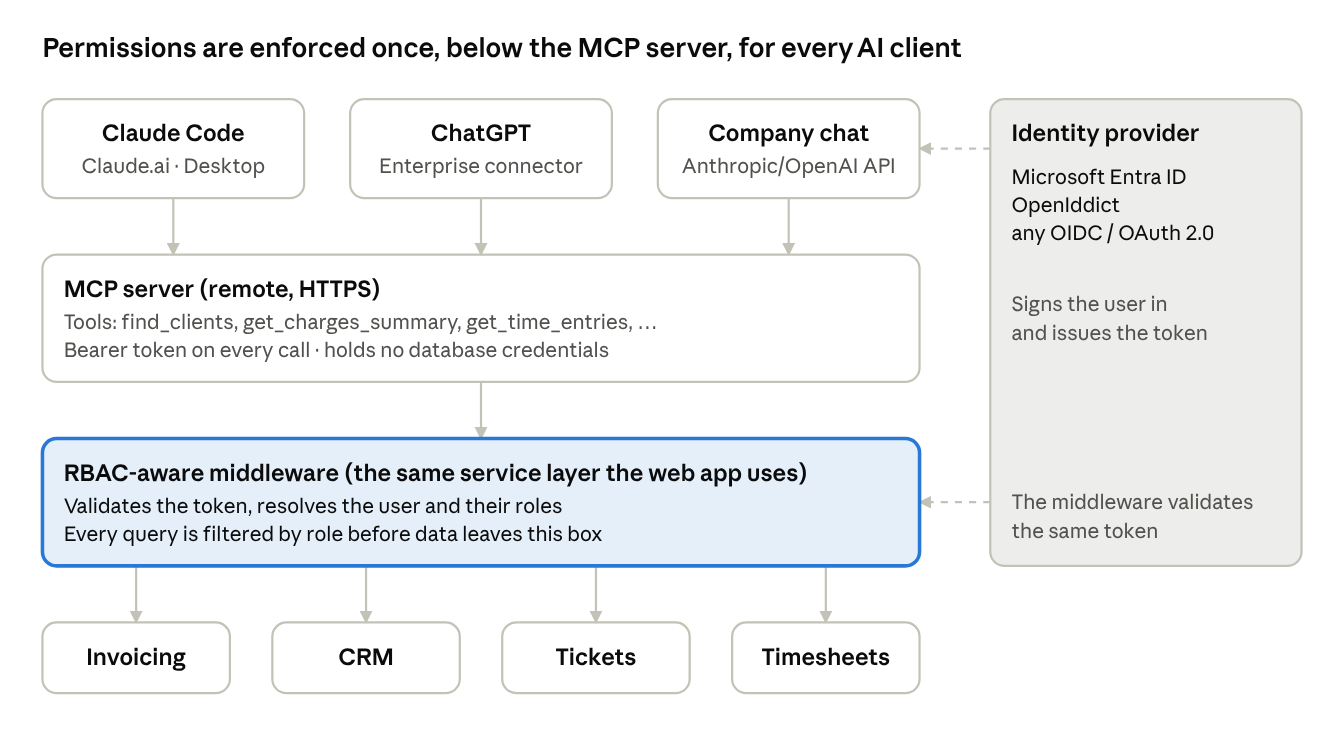
Permissions are enforced once, below the MCP server, for every AI client
Read top to bottom: the person signs in to their AI client with the company identity provider, the client carries the resulting token on every MCP call, the MCP server forwards the call to the middleware, and the middleware applies the same role filters it applies to the web app before touching the legacy systems.
In practice the layers are:
Identity and roles
The MCP server does not invent a user database. It trusts the identity provider the company already runs, through two standards that every AI client now supports:
userinfo endpoint carry the user's identifier, e-mail, and, crucially, their group or role claims.Which identity provider sits behind those standards is a deployment choice, not an architecture choice:
| Identity provider | Typical fit | How roles reach the middleware |
|---|---|---|
| Microsoft Entra ID (Microsoft 365) | Companies already on Microsoft 365; roles follow the existing security groups | groups or app-role claims in the access token, mapped to application roles |
| OpenIddict | .NET shops that want to own the authorisation server inside the application itself | The application issues the token and already knows its own roles |
| Keycloak, Auth0, Okta, Google Workspace | Mixed estates, or companies that want an identity product separate from the ERP | Role or group claims, or a lookup by subject id against the application's user table |
NoetikAdmin uses OpenIddict inside the application itself, because the application was already the system of record for who may do what. For a customer on Microsoft 365 we would instead federate: Entra ID authenticates, and the middleware maps Entra groups to its internal roles. The AI layer does not notice the difference.
The important part is what happens after the token arrives. The middleware does not trust a role claim blindly. It resolves the token to a user, loads that user's effective roles and assignments (which projects, which clients, which teams), and builds every query with those constraints baked in. If a manager removes someone from a project at 10:00, the AI stops seeing that project's data at 10:00, with no redeploy and no prompt change.
Three ways to use it
Once the server exists, the question becomes where people talk to it. We ended up supporting all three of the following, because different roles in the company want different things.
The fastest route. Claude (web, desktop and Claude Code) and ChatGPT both let an organisation register a remote MCP server as a connector. The person adds it once, signs in through the OAuth flow described above, and from then on can ask “which of my projects have unbilled time this month?” in the same chat they use for everything else.
For developers this is the natural home. A colleague in Claude Code can ask for a client's open service requests while fixing a bug for that client, without leaving the terminal. Because the token is theirs, they see what they would see in the web app and nothing more.
What you give up: control over the model, the system prompt, retention settings and where the conversation is processed. More on that in the data residency section.
For non-technical staff we built a chat page inside NoetikAdmin itself. It is a thin UI that calls the Anthropic Messages API (with the OpenAI Responses API as an alternative backend), passes the MCP server's tools as tool definitions, and runs the tool-call loop. The person is already signed in to the web app, so there is no second login: the chat uses their existing session to obtain a token for the MCP server.
This route costs more to build, but it gives you what the public clients cannot: a system prompt that speaks the company's vocabulary, control over which model answers which kind of question and what it costs, charts and tables instead of prose, and a full record of every question and every tool call kept in your own database.
The third route has no chat window at all. An agent, in this architecture, is nothing more exotic than a saved instruction, a trigger, an identity and a list of allowed tools. A manager writes it in plain language from a form in the web app, the way they would brief a new assistant:
Every Monday at 08:00, look at the charge requests that have been open for more than 30 days. Group them by client and e-mail me the list. If a client is over 2,000 euro, prepare a draft invoice for me to approve.
The server stores that text, schedules it as a background job, and when the trigger fires it runs the same model loop the chat uses: the instruction goes in as the task, the MCP tools go in as the menu, and the model reads, reasons and reports. The trigger can be a schedule, or an event in the business: a ticket breaching its SLA, a tender matching a profile, a subscription coming up for renewal.
What keeps a self-created agent inside the fence is the same set of rules as everything else in this post, plus a few of its own:
propose_* tool a chat would, and the result is a pending action waiting for a human. The agent cannot approve its own proposals, and it is not told the approval code.The reason this matters for an owner is that agents are where the time actually comes back. A question answered in chat saves a person ten minutes. An agent that checks the same thing every morning and only speaks when there is something to say removes the question from someone's head entirely. And because it is built on the MCP server, creating a new one is a form, not a project: no developer, no deployment, no new permissions.
This is the part of the NoetikAdmin layer we are building now, for a customer that asked exactly this question: “can we create agents ourselves on top of it?”. The first one is the overdue-charges report above.
The three routes differ in UI, cost and residency, but they all end at the same door. Whether the token was minted for Claude, for ChatGPT, for the in-house chat or for a nightly job, the middleware sees a user with roles and applies the same filters. There is no “AI mode” in the permission code. That is the property worth protecting as the system grows: add a fourth client tomorrow and you change nothing in authorisation.
Guardrails
Reading is the easy case. The moment a tool can change something (approve a charge, e-mail a client, close a ticket, change a shift) or return genuinely sensitive data (salaries, contracts, health records), roles alone are not enough. The person is authorised, and the model can still call the right tool with the wrong arguments at the wrong moment.
The same middleware that enforces roles is the place to add a second layer, chosen per tool:
| Guardrail | What it does | Use it for |
|---|---|---|
| Read-only by default | Tools that write are a separate set the administrator enables per role, never part of the default connector | Every deployment |
| Step-up authentication | The tool call is accepted only if the person completed a second factor (authenticator app, passkey) within the last few minutes; otherwise the client is told to re-authenticate | Payroll, contracts, anything regulated |
| Deferred execution on approval | The model prepares the action and the middleware stores it as a draft; a person approves it in the web app, and only then does it run | Invoices, e-mails to clients, purchase orders |
| Preview before commit | The tool returns exactly what would change (rows, amounts, recipients) and a second call with a one-time token performs it | Bulk updates, anything irreversible |
| Masking at the source | Sensitive fields are redacted inside the middleware before the result reaches the model, unless the tool and the role explicitly allow them | Tax numbers, bank accounts, personal data |
| Rate limits and spending caps | Calls per minute, rows per answer and money per day, per user and per tool | Every deployment |
| Audit trail | Who asked what, which tool ran with which arguments, what came back, which model saw it | Every deployment, and the first thing an auditor asks for |
The pattern that makes all of these cheap is that the model never executes anything; it proposes. In NoetikAdmin every tool that writes is named propose_* and does exactly that: it validates the request, builds a preview and stores a pending action that expires in ten minutes. The person gets a link and a two-digit number. On the approval page they see the preview and three numbers, and must press the one the assistant showed them, so a prompt-injected or confused model cannot approve on their behalf. For high-risk actions such as creating a draft invoice they also type a fresh code from their authenticator app. Only then does the action run, server-side, as that user, and the assistant reads the outcome back with a separate tool. Issuing the invoice to the tax authority and e-mailing clients stay in the web app on purpose.
Working example
NoetikAdmin is the internal platform we run Noetik on: clients, projects, service requests, support tickets, time tracking, charge requests and invoicing, with about thirty MCP tools on top. The screen below is masked, but the behaviour is real.
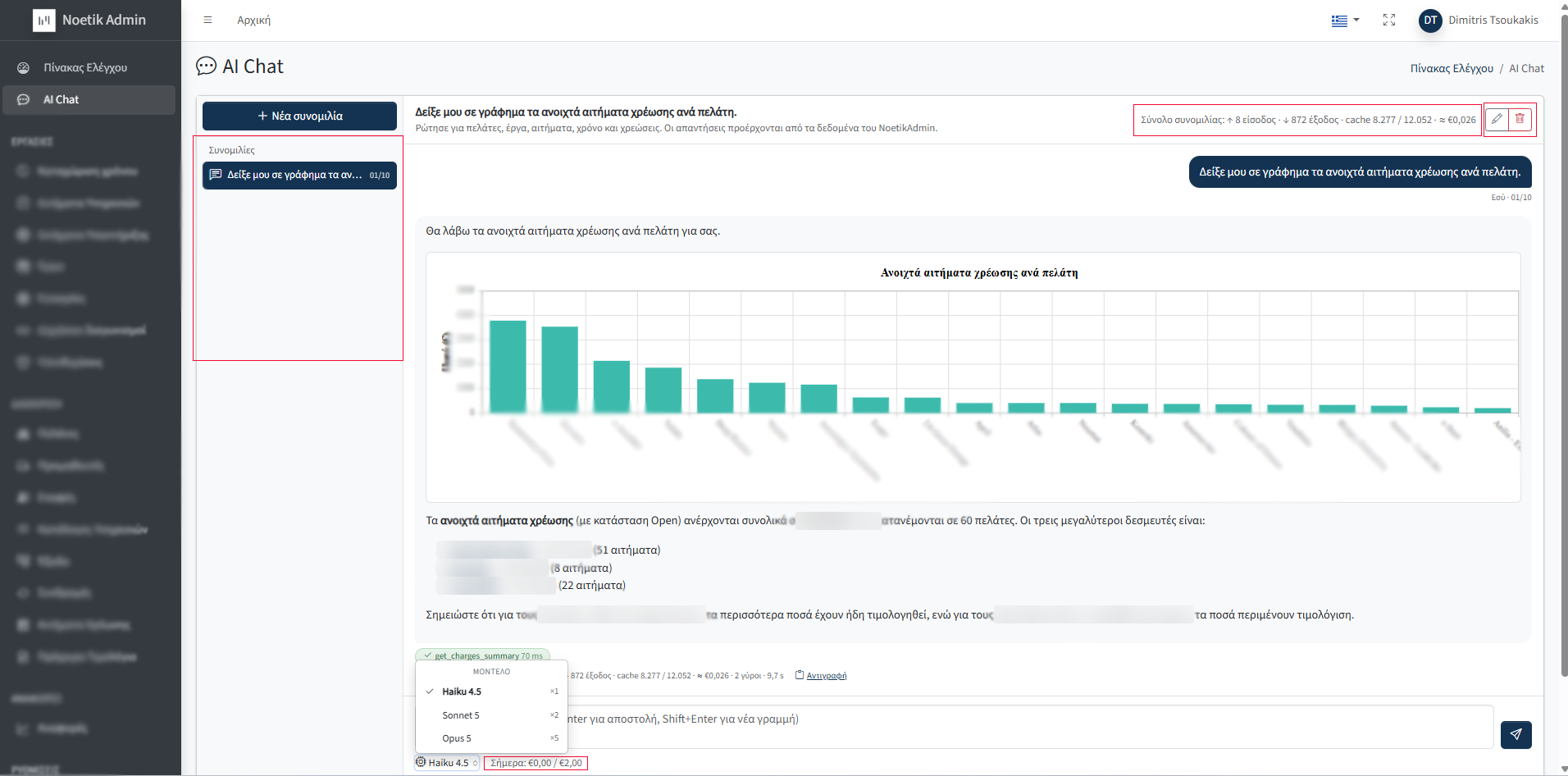
One question, one tool call, an answer limited to what this user may see
An account manager typed, in Greek, “show me a chart of the open charge requests per client”. What happened next:
get_charges_summary and called it once. The green chip under the answer shows the tool name and its latency, so the person can see where the numbers came from.The details around the answer are the parts an owner tends to care about:
Data residency
RBAC decides who sees data. Data residency decides where that data is processed once the model sees it, and the two are easy to confuse. Every tool result the MCP server returns is sent to a language model. If that model runs in a US data centre, your client list just crossed the Atlantic, with the permission of a perfectly authorised user.
The questions to ask any provider, for any of the three consumption routes:
| Question | Why it matters |
|---|---|
| In which region is the prompt processed? | GDPR transfer rules; some customers contractually require EU processing |
| How long are prompts and results retained? | A tool result with client names sitting in logs for 30 days is a data store you did not plan for |
| Is the data used to train models? | Consumer tiers of chat products often default to yes; business and API tiers to no |
| Is there a signed Data Processing Agreement and are sub-processors listed? | Required to use the provider lawfully as a processor at all |
| Can retention be set to zero for the API? | The strongest control for the in-house chat route |
How the three routes compare, as of writing (check the provider's current terms before relying on this):
Two mitigations apply regardless of the route and are cheap:
get_charges_summary returns totals per client, not every charge line. Identifiers that are only useful to the database (internal IDs, tax numbers) are left out of tool results unless the question needs them.For the document side of the same question, see our guide to private AI knowledge systems (RAG).
Takeaways
The AI layer took weeks, not months, because we did not build an AI system. We built a thin protocol adapter over a permission model that already existed. If you are weighing something similar:
The result is that a question which used to mean two exports and a spreadsheet now takes one sentence, from anyone in the company, and returns exactly what that person was allowed to know in the first place.
If you run a company on a handful of systems that do not talk to each other and want to see how this would look on your data, get in touch, or read more about our AI solutions and intelligent automation.
 CALL US
 CONTACT
Share this page